Data Sanitization: What It Is, Why It Matters, and How to Do It Right
Basic Summary Data sanitization is the process of permanently removing data from storage devices so it cannot be recovered. This post covers the three primary methods (Clear, Purge, Destroy), relevant standards, and a practical five-step process for getting it done right. It also addresses why incomplete sanitization creates real compliance and security risks. Who This Is For
Key Takeaways
|
Most businesses assume that deleting a file or reformatting a drive makes the data gone. It does not. Standard deletion removes the reference to the data, not the data itself. The actual content stays on the storage device until something else overwrites it, and with the right tools, it can be pulled back.
For manufacturers and industrial service companies that handle customer records, proprietary processes, pricing data, or regulated information, the gap between what people assume and what actually happens is where data security risk lives.
Data sanitization closes that gap. It is the process of permanently and verifiably removing data from storage media so it cannot be recovered, even with advanced forensic tools. Done correctly, it protects your business when hardware is retired, sold, or repurposed, and it gives you documented proof that sensitive data was properly handled.
What Data Sanitization Actually Means
The term data sanitization gets used loosely, which creates confusion. People use it interchangeably with data deletion or factory reset, but these are not the same thing.
A factory reset returns a device to its factory settings, removing user-facing content. But on most devices, the original data remains on the storage media and can be recovered. A standard file deletion marks the space as available but does not overwrite the underlying data. Even data erasure software varies significantly in thoroughness depending on the method applied.
True data sanitization means irreversibly removing or destroying the data so that it cannot be reconstructed, even partially. The goal is to render data unrecoverable under any circumstances, including through the use of advanced forensic tools or reverse engineering attempts.
This applies to all types of storage media: hard disk drives, solid-state drives, magnetic disks, optical media, mobile devices, USB drives, and cloud storage environments. Each media type has characteristics that affect which sanitization method works best.
The data security lifecycle includes multiple stages, and sanitization is what happens at the end of that lifecycle when a device or dataset is no longer needed. It is also relevant during the lifecycle itself, when sensitive information needs to be removed from a system before it is repurposed or migrated.
Why Incomplete Data Sanitization Creates Real Risk
Incomplete data sanitization is more common than most organizations realize. It happens when teams rely on methods that feel thorough but do not go far enough.
A factory reset on a mobile device does not wipe flash memory at the byte level. A quick format of a hard drive does not remove the underlying data. Encryption alone does not sanitize anything until the encryption keys are destroyed. And data stored in cloud storage environments often persists in backup systems long after the primary copy is deleted.
The consequences of getting this wrong are not theoretical. Retired hardware that still contains sensitive data has been purchased secondhand and found to contain customer records, financial data, and trade information. Regulatory bodies treat inadequate sanitization as a compliance failure, with penalties tied to the type of data involved and the industry you operate in.
For manufacturing companies, the sensitive information at risk often includes customer pricing, vendor agreements, proprietary product specs, employee records, and operational data that competitors or bad actors would find valuable. The exposure is real, and the damage from a breach tied to improperly disposed hardware is significant.
Getting sanitization right also matters inside the organization. When systems are repurposed or shared across teams, residual data from a previous user can become accessible. User errors in this area are not always malicious, but the outcome is the same.
The Three Methods of Data Sanitization
The National Institute of Standards and Technology (NIST) SP 800-88, titled Guidelines for Media Sanitization, defines the framework that most organizations and compliance programs reference. It establishes three primary data sanitization methods: Clear, Purge, and Destroy. Each one is suited to different situations based on the sensitivity of the data and the intended future use of the storage device.
Clear
Clearing is the baseline method. It applies logical techniques to overwrite data on a storage device, making the original data unrecoverable through standard operating system commands or basic file recovery software.
The most common approach is overwriting data by writing new patterns of ones, zeros, or random characters across every sector of the storage media. This is often called data wiping or file shredding. On hard disk drives and similar media, a single pass is often sufficient. On some storage types, multiple passes are required to make the original data unrecoverable.
Clearing does not protect against advanced forensic tools. A determined adversary with specialized equipment and expertise may still be able to recover usable residual data from cleared media. For that reason, Clear is appropriate for devices being repurposed within the same organization or in lower-risk scenarios, not for media containing highly sensitive data that is leaving your control.
Purge
Purging goes further. It uses techniques that are more resistant to advanced forensic tools, making data unrecoverable even under laboratory conditions.
For magnetic disks and most traditional hard drives, degaussing is a common purge technique. It exposes the storage media to a strong magnetic field that disrupts the magnetic patterns storing the data. The result is that the data is destroyed beyond recovery.
For solid-state drives and other flash-based memory devices, cryptographic erasure is the standard purge approach. Cryptographic erasure typically works by encrypting the entire storage device and then destroying the encryption keys. Without the keys, the encrypted data is unreadable. Cryptographic erase built into many modern devices through encryption features makes this method fast and auditable.
Block erase and secure erase commands are also purge-level techniques available on some devices. These write at the byte level across the entire storage media, not just the areas the operating system knows about. This is important because data stored in areas outside the normal file system, such as hidden partitions or remapped sectors, would survive a Clear but not a Purge.
Purge is appropriate for storage devices containing sensitive data that will leave your organization, be returned to a vendor, or be repurposed for a significantly different use.
Destroy
Destruction is the most absolute method. It physically destroys the storage media to the point that it cannot be reused, and the data cannot be recovered.
Common destruction methods include disintegration, incineration, shredding, and crushing. For most hard disk drives and optical media, physical shredding or crushing is standard. The goal is to make it impossible to reassemble or read the original media.
Destroy is appropriate when the storage device has reached the end of its useful life, when the data sensitivity is high enough that no other method provides adequate assurance, or when the device itself is damaged, and other methods cannot be reliably applied.
It is worth noting that physically destroying a device does not always mean the data is gone if the destruction is incomplete. Shredding to the right particle size matters. Standards define the acceptable particle size for each media type, and cutting corners here defeats the purpose.
Standards and Regulations That Define the Bar
NIST SP 800-88 is the most widely cited standard for media sanitization in the United States. It provides the three-method framework described above and gives specific guidance for each storage media type. Organizations that handle federal data are required to follow it. Many private-sector companies use it as the baseline even when not legally required, because it is well-documented and defensible.
Other relevant frameworks include the DoD 5220.22-M standard, which historically specified a multi-pass overwrite method and is still referenced in some government and defense contexts. HIPAA sets data sanitization requirements for healthcare organizations, protecting patient information. PCI DSS covers payment card data and includes specific requirements for rendering data unrecoverable when hardware is decommissioned.
For manufacturers and industrial service companies, the applicable regulations depend on the type of data you hold. If you process payments, handle employee health records, work with government contracts, or operate in regulated industries, your sanitization practices need to meet those specific requirements. Following NIST SP 800-88 as a baseline provides a defensible foundation regardless of which regulation applies.
The documentation requirement is not optional in most of these frameworks. Generating auditable reports that record what was sanitized, when, by whom, and using which method is a core part of compliance. A certificate of sanitization is not just a formality. It is your evidence that due diligence was exercised.
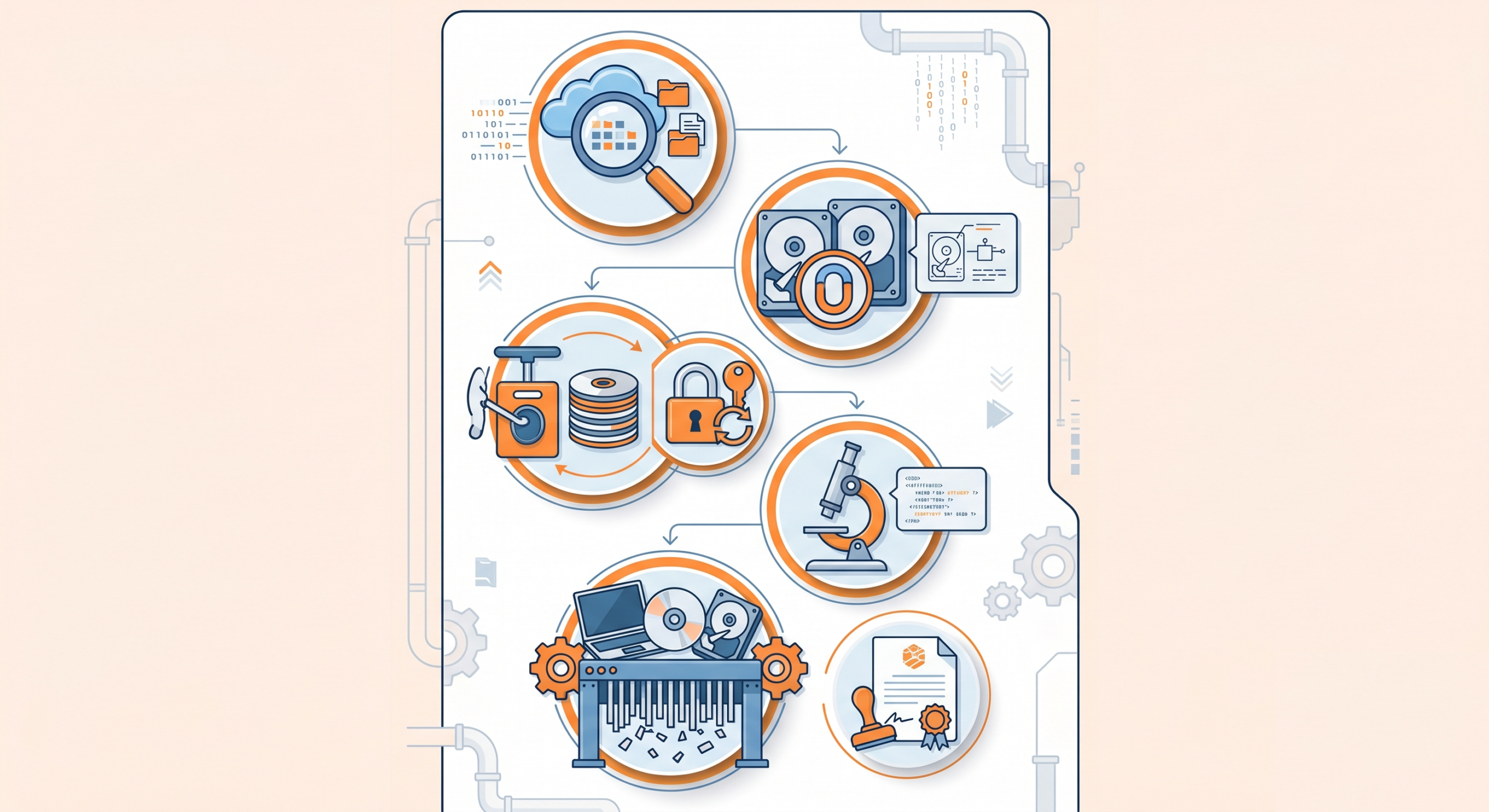
A Practical Five-Step Data Sanitization Process
Having a defined process matters as much as the method itself. Ad-hoc approaches lead to gaps, missed devices, and undocumented actions that cannot be verified later. Here is a straightforward process that maps to the NIST framework and can be applied inside most manufacturing and industrial service environments.
Step 1: Identify
Locate all data sources across your environment. This includes obvious assets like servers, workstations, and mobile devices, but also storage media that tends to be overlooked, such as backup tapes, external drives, network-attached storage, embedded storage in industrial equipment, and cloud storage volumes tied to retired accounts.
Building an accurate asset inventory is the foundation. You cannot sanitize what you do not know exists. This step should be repeated on an ongoing basis as hardware is acquired, retired, or transferred.
Step 2: Select a Method
Choose the appropriate sanitization method based on the sensitivity of the data stored and what will happen to the device after sanitization. A device containing basic operational logs being repurposed internally warrants a different approach than a server holding customer financial records being sent to a recycler.
Use the Clear, Purge, Destroy framework to guide the decision. Document the reasoning, not just the selection, so it can be reviewed later if questions arise.
Step 3: Sanitize
Apply the chosen method using software or hardware tools appropriate for the media type. Software-based methods, such as overwriting data tools, work well for magnetic hard drives when applied correctly. Cryptographic erasure is typically the most effective method for solid-state and flash-based storage. Physical destruction is handled by specialized equipment or certified third-party services.
Follow the process for the media type as specified in your chosen standard. A software-based method that works on a magnetic hard drive may not achieve the same result on an SSD. Match the tool and technique to the target data and the storage media.
Step 4: Verify
Validate that the sanitization was successful. For software-based methods, this typically involves reading back a sample of the storage media to confirm that the original data is gone. Some tools include verification as part of their process and generate logs automatically.
Verification is not optional. It is the only way to confirm that the process worked as intended. A time-consuming process that skips verification provides no real assurance.
Step 5: Document
Generate a certificate of sanitization for each device or dataset processed. This document should include the asset identifier, the sanitization method applied, the date, the operator, and the verification result.
This record is your protection. It demonstrates that you followed a defined process, applied an appropriate method, and confirmed the outcome. In the event of a regulatory audit, a legal dispute, or an insurance claim, this documentation is what establishes that your organization acted responsibly.
Where Software Fits Into Your Data Sanitization Strategy
Data sanitization is not just a hardware problem. The systems your team uses every day, including custom-built applications for order management, quoting, inventory, and customer records, all handle sensitive information that needs to be managed as part of a broader data security strategy.
When applications are retired or migrated, the data they hold does not disappear automatically. Database records, file attachments, cached information, and logs can persist in environments that are no longer actively managed. A comprehensive approach to data sanitization includes the software layer, not just physical devices.
This is especially relevant when companies move to new systems or bring on a software partner to take over maintenance. Understanding what data exists, where it is stored, and what happens to it when a system changes is a foundational part of responsible data management.
If your organization is managing aging custom software with unclear data retention practices, or you are approaching a migration that involves sensitive operational data, it is worth having a direct conversation about what controls are in place. Book a call with NorthBuilt to talk through where your current systems stand and what a responsible approach looks like for your situation.
Common Mistakes That Undermine Data Sanitization
Even organizations with good intentions make mistakes in this area. A few patterns show up repeatedly.
Relying on factory reset as a sanitization method is one of the most common errors. Factory settings restore the user interface and software state but do not necessarily wipe the underlying storage media. This is particularly problematic with mobile devices and consumer-grade hardware that gets repurposed or donated.
Overlooking cloud storage is another gap. Data that lives in cloud environments does not follow the same physical lifecycle as on-premise hardware. Deleting a cloud storage bucket does not guarantee that backups, snapshots, or replicated copies are also removed. Cloud providers have their own data retention policies, and understanding those policies is part of a complete sanitization plan.
Applying a single method to all media types without accounting for how different storage technologies work leads to incomplete sanitization. Most tapes and optical media require different approaches than hard disk drives or solid-state drives. A software-based overwrite that works on a traditional hard drive may have no effect on a read-only optical disk.
Skipping documentation is a mistake that only becomes visible later. When an audit or incident occurs, the absence of records is treated as an absence of action. The documentation step is not administrative overhead. It is the evidence that the process happened.
Finally, treating sanitization as a one-time project rather than an ongoing practice creates cumulative risk. New devices enter the environment, old ones leave, and the window between retirement and sanitization is where exposure happens. Building sanitization into your standard asset management process, rather than treating it as a special project, is what closes that window reliably.
Building a Culture of Data Responsibility
The technical side of data sanitization is well-defined. The standards exist. The methods work when applied correctly. The harder part for most organizations is making it a consistent practice rather than a reaction to a specific event or regulatory requirement.
That consistency comes from treating data sanitization as part of normal operations, not a separate security initiative. It means including it in procurement decisions, so teams know what sanitization requirements apply before a device is purchased. It means incorporating it into offboarding workflows, so devices are not left in a drawer waiting to be handled someday. It means assigning clear ownership, so there is always someone accountable for making sure it happens.
For businesses running on custom software, data responsibility also means knowing what your applications do with the data they collect. Are there retention policies in place? Is sensitive information encrypted at rest? What happens to customer or operational records when a contract ends? These questions matter, and the answers should be documented.
NorthBuilt works with manufacturers and industrial service companies to help them understand and manage the software systems they depend on. If you are not sure how your current systems handle sensitive data across their lifecycle, our process starts with understanding your environment before recommending anything. That is where good decisions start.
The Bottom Line on Data Sanitization
Data sanitization is not a one-time project. It is an ongoing practice that should be built into how your organization manages hardware, software, and data across their full lifecycle. The methods are well-defined. The standards exist. The process is straightforward. What determines whether your organization is actually protected is whether anyone owns it and whether it gets done consistently.
For manufacturers and industrial service companies running on custom software, that question extends past physical devices. The applications your team uses every day hold sensitive data, and most were not built with a clear end-of-life plan for that data. Knowing what your systems retain, where they live, and what happens to them when things change is part of the same problem.
If you are not confident that your current systems handle sensitive data responsibly across their lifecycle, that is a gap worth addressing now.

Chris Morbitzer
Chris Morbitzer is CEO and co-founder of NorthBuilt, a Minnesota-based software development partner that helps independent manufacturers, agricultural companies, and industrial services firms across the Midwest implement AI and build practical technology solutions.